

Everything you need to know about the upgrade to digital QR-based access cards — and what it means for you.
Effective 10 April 2026
Visual walkthrough
See what's new!
Step through the journey from physical card to digital access.
01 / 05
Collect in person
Easy to misplace
The old way: physical card collection
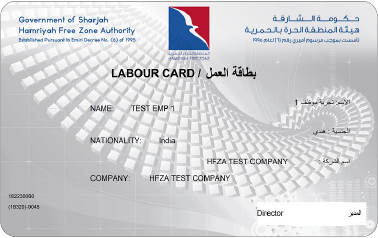
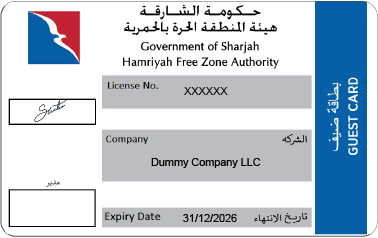
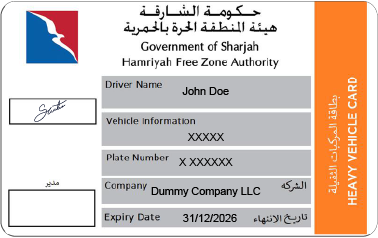
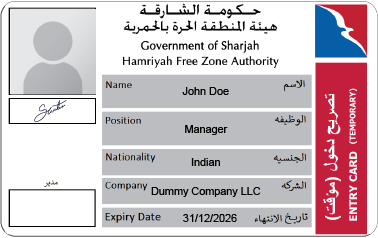
After completing a service, you had to visit the head office in person to collect your physical digital card. The card was then used to enter the freezone at gates. Replacing a lost card required another visit.
›
10 Apr 2026
The transition: physical → digital
From 10 April 2026, the system will no longer issue physical cards for newly completed services. A digital QR card will be generated instantly and available directly in your ePortal account. Your existing physical card remains valid.
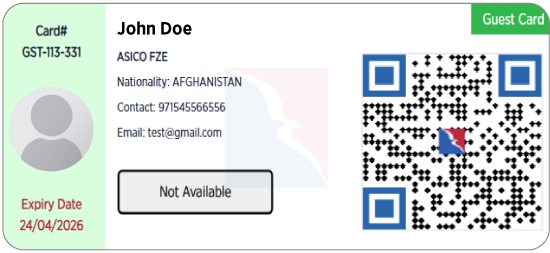
Your new digital QR gate card
Once your service is completed, the digital card is issued instantly to your ePortal account — no trips required. It displays a secure QR code linked to your identity, which is scanned at all entry gates.
Wallet
Add card
Save to Apple Wallet
With one tap from your ePortal, add your digital QR card directly to your phone's wallet. It shows up just like a boarding pass — ready whenever you arrive at the gate, even offline.
Add to Apple Wallet
Google Wallet
At the gate — same experience, zero hassle
Show your phone at the gate scanner. The security officer will scan your digital QR code for instant, contactless identity verification.
Digital Gate Pass — Scan directly from your phone
Contactless — No physical exchange required
Rollout timeline
What happens and when
A clear timeline so you know exactly what to expect.
Now — before 10 April 2026
System is live and running as normal
The current ePortal and physical card process continues unchanged. You can still apply for services, complete them, and collect your physical card from Security Department office.
10 April 2026
New digital system goes live
The upgraded portal launches. All newly completed services will issue a digital QR card to your ePortal account automatically. Physical card collection from Security Department office is discontinued for new services.
From 10 April 2026
Digital QR copy available for active physical cards
If you hold a valid physical card issued before the launch, a "Generate Digital Copy" option will appear in your ePortal account. You can continue using your physical card at gates until it expires.
Upon card expiry
Physical cards are retired naturally
Once your physical card expires, you need to renew it normally and get the digital card through ePortal service.
Frequently asked questions
Got questions? We have answers.
Sorted by topic. Click any question to expand.
Why is the system switching to digital cards?
The move to digital cards removes the need for you to visit the head office in person, eliminates the risk of losing or damaging your card, and makes renewals and replacements instant. It also aligns with the freezone's wider digital transformation programme to bring all services fully online.
When exactly does this change take effect?
The new system goes live on 10 April 2026. Any service completed on or after that date will automatically generate a digital QR card. Services completed before that date will follow the current physical card process through to completion.
Do I need to do anything to prepare?
No action is required from you before the launch date. If you have an active physical card, it will continue to work. After 10 April, simply log in to your ePortal account — your digital card will be accessible from your account dashboard, and you can optionally add it to your wallet at that point.
Make sure your ePortal contact details and mobile number are up to date so you receive notifications when your digital card is ready.
Will Security Department office still be accessible for other matters?
Yes. Security Department office remains available for enquiries, in-person, and services that are not yet fully digital. The only change is that card collection will no longer be handled there after 10 April 2026.
I already have a physical card. Does it stop working on 10 April?
No. Your physical card remains fully valid at all gate scanners until its printed expiry date. Nothing will change for you on 10 April — you can continue using your physical card as normal.
There is no urgency to switch to the digital card. You can generate a digital copy at any time after launch, or simply wait until your physical card expires.
Can I get a digital copy of my existing physical card?
Yes. From 10 April 2026, a "Generate Digital Copy" button will appear in the card section of your ePortal account for all active physical cards. Tapping it will create a digital QR version of your current card with the same validity and permissions.
1
Log in to ePortal, go to Dashboard and find "Active Gate Cards" Section
2
Select your active physical card
3
Tap "Generate Digital Copy"
4
Download, screenshot, or add to Wallet
My physical card is about to expire. What should I do?
If your physical card expires after 10 April 2026, simply complete your renewal service through ePortal as usual. Once the service is processed, your new digital QR card will be issued automatically to your account — no visit required. If your card expires before 10 April, the current renewal process applies.
I lost my physical card. What do I do before 10 April?
Before 10 April, the existing card replacement process remains in place. Please contact the freezone support team or visit the Security Department office. After 10 April, card replacement will be handled entirely through ePortal with a new digital card issued instantly.
If your loss occurs close to the 10 April launch, the support team may be able to process your replacement digitally even earlier. Contact support for assistance.
Where do I find my digital card in ePortal?
After 10 April, your digital card will appear on Dashboard in the ePortal. You will also receive an in-portal notification and an email when your card is ready. From that screen you can view, download, or add it to your wallet.
How do I add the card to Apple Wallet?
1
Open ePortal on your mobile device and go to Dashboard and find "Active Gate Cards" Section
2
Tap "Generate Digital Card"
3
Scroll down and find the button "Add to Apple Wallet"
4
Confirm on the wallet app prompt — done
The card will not sync automatically when your card is renewed. You need to re-add it every time upon renewal.
What if I don't have a smartphone or wallet app?
The wallet app is optional — it's just a convenience. You can always log in to ePortal from any device (including a desktop browser) and display your QR card from there. Alternatively, your existing physical card will continue to work at gates until it expires, giving you time to set up the digital option at your own pace.
Is the digital card secure? Can someone copy my QR code?
Yes, the digital card is secure. The QR code is cryptographically signed and validated in real time when scanned at the gate. Treat your card like any other credential and do not share your ePortal login.
If you believe your account has been compromised, contact support immediately. Cards can be revoked and reissued within minutes.
Will the gate scanners change? Do I need to use a different lane?
No changes to the physical gate setup. All existing scanners are fully compatible with both physical cards and digital QR codes. No new lanes, no different process. Simply hold your phone screen (or physical card) up to the scanner as you normally would.
Can I use both my physical card and digital card at the same time?
Yes. Both are valid simultaneously until your physical card expires. Many users will carry their physical card as a backup while getting comfortable with the digital card. You do not need to deactivate one to use the other.
My digital card isn't showing up in ePortal after my service. What do I do?
Card generation is usually instant but may occasionally take up to 15 minutes after service completion. Try refreshing the My Cards page. If the card does not appear within 30 minutes of your service being marked as completed, please contact ePortal support with your service reference number.
Until your digital card is ready, your existing physical card (if active) will continue to work at all gates.
The gate scanner didn't read my QR code. What should I try?
Try these steps in order:
1
Make sure your screen brightness is set to maximum
2
Hold the QR code steady and 10–15 cm from the scanner
3
Refresh the card screen in ePortal and try again
4
If using the Wallet app, try the ePortal app directly instead
5
If still failing, use your physical card and contact support
I can't log in to ePortal. How do I access my card?
If you've added your card to Apple Wallet Wallet, you can still access it without logging in to ePortal. If you cannot log in and do not have a Wallet copy, contact gate security staff who can assist with manual identity verification. For ePortal login issues, use the "Forgot Password" option or call the support line.
I changed my phone. How do I get the card on my new device?
Simply log in to ePortal on your new device, go to Dashboad and find Active Gate Card Section, and tap "Generate Digital Card" then tap "Add to Wallet" again. If you restored your new phone from a backup, the card may transfer automatically to the Wallet app. Your digital card data lives in the ePortal system, not on your device, so it is always recoverable.
Still have questions?
Our support team is available to walk you through the transition and help with any concerns.